
Full trades CRM
Every part of the business. One connected record.
Leads, quotes, jobs, projects, customers, crews, invoices, payments and profit stay joined from the first enquiry to the final euro.
Lead to profit
Enter it once. Move it through the whole business.
The same customer and work record moves from the first call to the final payment. No retyping it into a second list when the job changes stage.
Lead
Name, contact details, site and what they need.
Quoted
Built from your price book and sent from the record.
Planned
Booked as a job, project or recurring visit.
Completed
Crew notes, photos, hours and materials stay attached.
Invoiced
Raised from the work already recorded.
Paid
Payment and job profit close the loop.
Owner and office
Run the office without chasing the field.
See new leads, open quotes, live projects, crew schedules, overdue invoices and job profit before any of them become a surprise.
 JobDiary
Today
11 jobs
- 4 done
- 2 on site now
- 4 still to start
Exceptions
1 running late
- 1 needs a call
- 0 unscheduled
Money owed
€1,240
- Across 8 invoices
- 2 overdue
Crews out
2 crews
- 11 jobs today
- All on route
Sales and projects
6 open
- 3 quotes due
- 2 projects live
Product screens use demonstration data.
The field
Give the crew today's work, not the whole CRM.
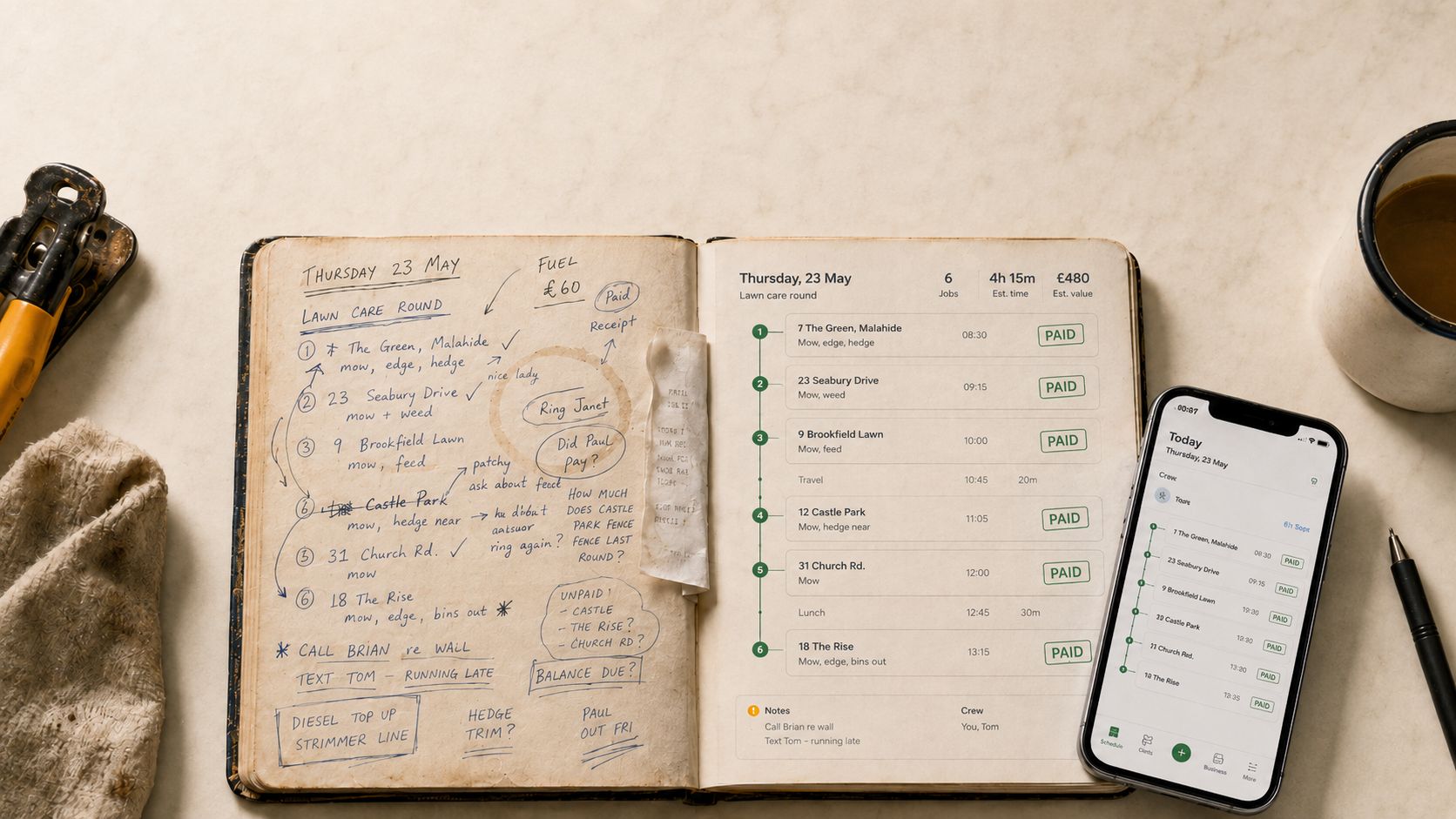
Each crew member gets the jobs, addresses, notes and actions they need on the phone already in their pocket.
- 08:307 The Green€30Done
- 09:1523 Seabury Drive€30Done
- 10:009 Brookfield Lawn€35In progress
- 11:0512 Castle Park€45Next
Today's work
One-off jobs, project visits and repeat work in one clear list.
- 7 The GreenDone
- 23 Seabury DriveDone
- 9 Brookfield LawnIn progress
- 12 Castle ParkNext
- 31 Church RoadScheduled
- 18 The RiseScheduled
The order to drive it
Stops arranged before anyone turns a key.
- Payment
- Photo
- Hours
Job notes
Mow front and back. Edge the paths. Bins out.
Mark job done
The record from site
Hours, notes, photos and payment captured against the job.
Product screens use demonstration data.
| Time | Job | Status |
|---|---|---|
| 08:30 | 7 The GreenMow, edge, hedge | Done |
| 09:15 | 23 Seabury DriveMow, weed | Done |
| 10:00 | 9 Brookfield LawnMow, feed | In progress |
| 11:05 | 12 Castle ParkMow, hedge rear | Next |
| 12:00 | 31 Church RoadMow | Scheduled |
| 13:15 | 18 The RiseMow, edge, bins out | Scheduled |
- 7 The GreenDone
- 23 Seabury DriveDone
- 9 Brookfield LawnIn progress
- 12 Castle ParkNext
- 31 Church RoadScheduled
- 18 The RiseScheduled
Recurring work
Rounds are built in. They are not the whole product.
Set a repeat cycle once and let the next visit appear when the current one is completed. It sits beside one-off jobs and live projects in the same CRM.
Every repeat job carries its cycle
Weekly, fortnightly, every four weeks or a schedule that suits the customer.
Changes stay with the work
Move a visit or a day and the office and crew see the same plan.
Plan repeat and one-off work together
See the whole workload before assigning the day.
Routes follow the work on the map
Order field stops without turning the CRM into a route-only app.
Product screens use demonstration data.
Quote to profit
Keep the numbers attached to the job.
Send the quote, turn it into work, capture what happened, raise the invoice and see what the job earned from the same connected record.
- Sent
Quote sent
Built from your price book and customer record.
- Accepted
Accepted
Approved work becomes a job or project.
- Sent
Invoice sent
Raised from the completed work.
- Overdue
Reminder
A polite nudge when an invoice goes quiet.
- Paid
Paid
Payment closes the loop and feeds the report.
Optional reminders can run at day 3, day 7 and day 14
Card payments run through your own Stripe account. The money goes directly to your bank, not through JobDiary.
Weak signal
Keep recording the work when the signal drops.
Supported field actions stay on the phone and sync when the connection returns, so site records do not depend on perfect coverage.
Runs on the phone they already have
A current web browser is enough. There is no separate field device to buy.
Supported taps are queued
Field updates made without signal are saved on the phone.
The record catches up
When the connection returns, queued updates sync back to the office.
- Payment
- Photo
- Hours
Job notes
Mow front and back. Edge the paths. Bins out.
Mark job done
Product screens use demonstration data.
One system, role by role
The same business record. The right view for each person.
The owner controls the whole business, the office keeps work moving and the crew sees exactly what is needed on site.
Owner
The full picture across sales, work, money, people and profit.
- Leads, quotes and live projects
- Invoices, payments and job profit
- Reports, vehicles and materials
Office
The operational view for keeping customers and crews in sync.
- Customer and site history
- Schedule, routes and crew changes
- Open actions and money owed
Crew
Today's work without the office clutter.
- Jobs and addresses
- Notes, hours and photos
- Complete work and record payment
Work through the practical details
- CRM vs job management software for a small trade business
- How to calculate profit on a trades job
- What information belongs on a job dispatch sheet?
- A landscaping quote template that makes scope clear
Explore each product workflow
- Trades CRM for leads and customer records
- Quoting and invoicing software for trades
- Crew scheduling software for small trades teams
- Job costing software for small trade businesses